Background
I have been running a bespoke local CLI setup built on top of Kiro with AWS MCP server tools for a while now. It lets me query and manage my AWS resources conversationally, leveraging the model of my choice and a curated set of MCP servers. When a colleague I respect pointed me toward Yolo CLI, a new entrant in the semantic cloud management space, I figured the only fair way to evaluate it was to run identical prompts through both tools and compare the outputs side by side.
Getting Started with Yolo
The Yolo team appears to be iterating quickly. When I first tried setting it up on a Thursday their OAuth was broken preventing api key creation. Then upon trying again on Friday after the OAuth bug was fixed, I ran into an AWS authentication error using temporary STS credentials. After downloading the latest version of the CLI a couple days later, it worked without issue. At least they are trending in the right direction with their bug fixes!
The Comparison
I ran a series of progressively detailed prompts through both tools. Here is how they stacked up.
Prompt 1: “How many EC2 instances do I have running right now?”
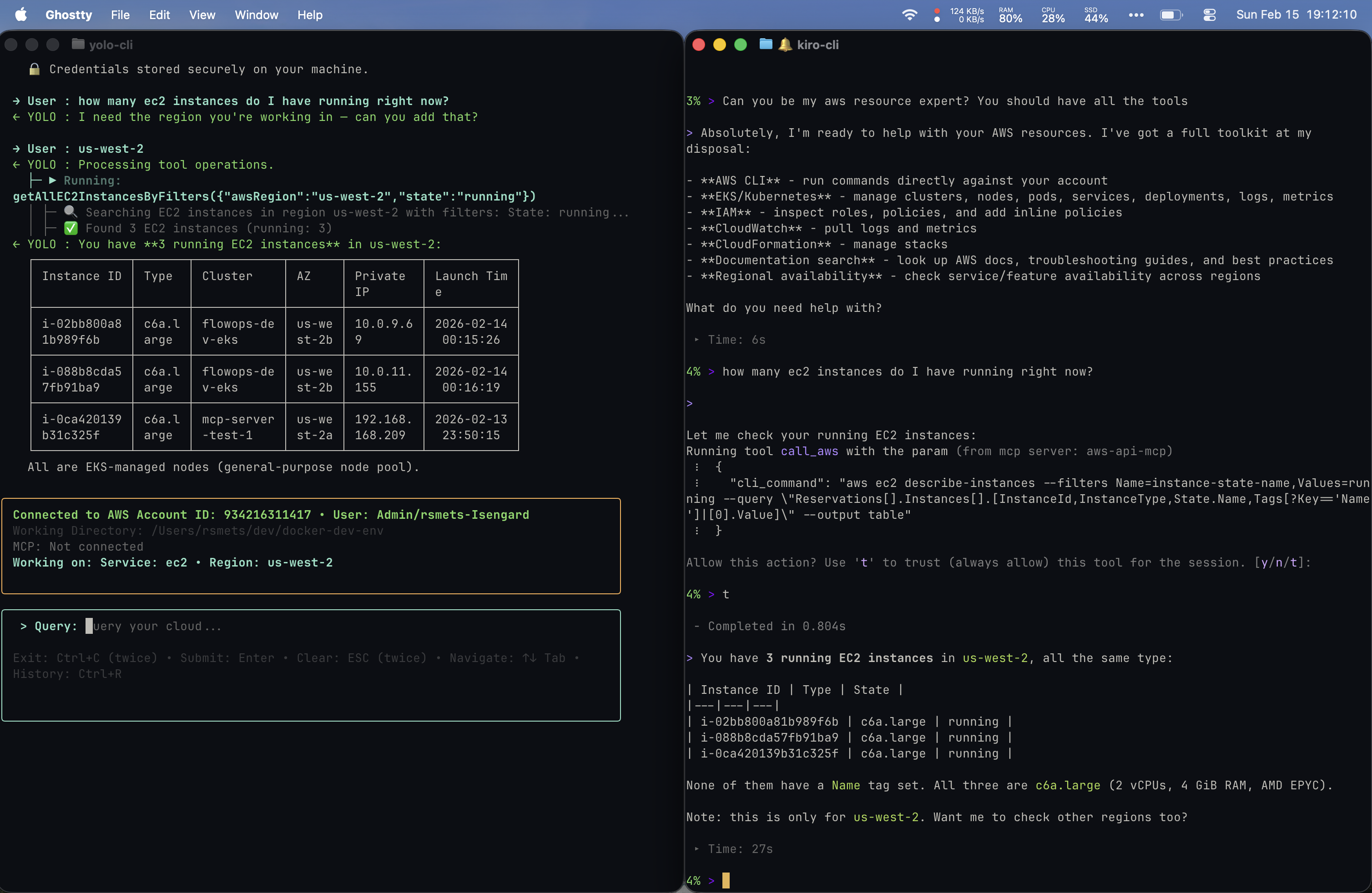
Both tools correctly identified 3 running c6a.large instances in us-west-2. Yolo proactively surfaced a rich table with Instance ID, Type, Cluster, AZ, Private IP, and Launch Time, also identifying them as EKS-managed nodes. My Kiro CLI returned a more minimal table (Instance ID, Type, State) and offered to check other regions, but did not volunteer AZ or cluster info unprompted.
Prompt 2: Requesting More Detail
Because Yolo had already surfaced AZ information unprompted, my follow-up to Yolo was simply: “Can you give me more detailed info about these instances?” For my Kiro setup, I had to be more specific: “Can you give me more info about these instances such as the AZ they are in?” Yolo’s proactive verbosity in the first prompt saved me a round trip here.
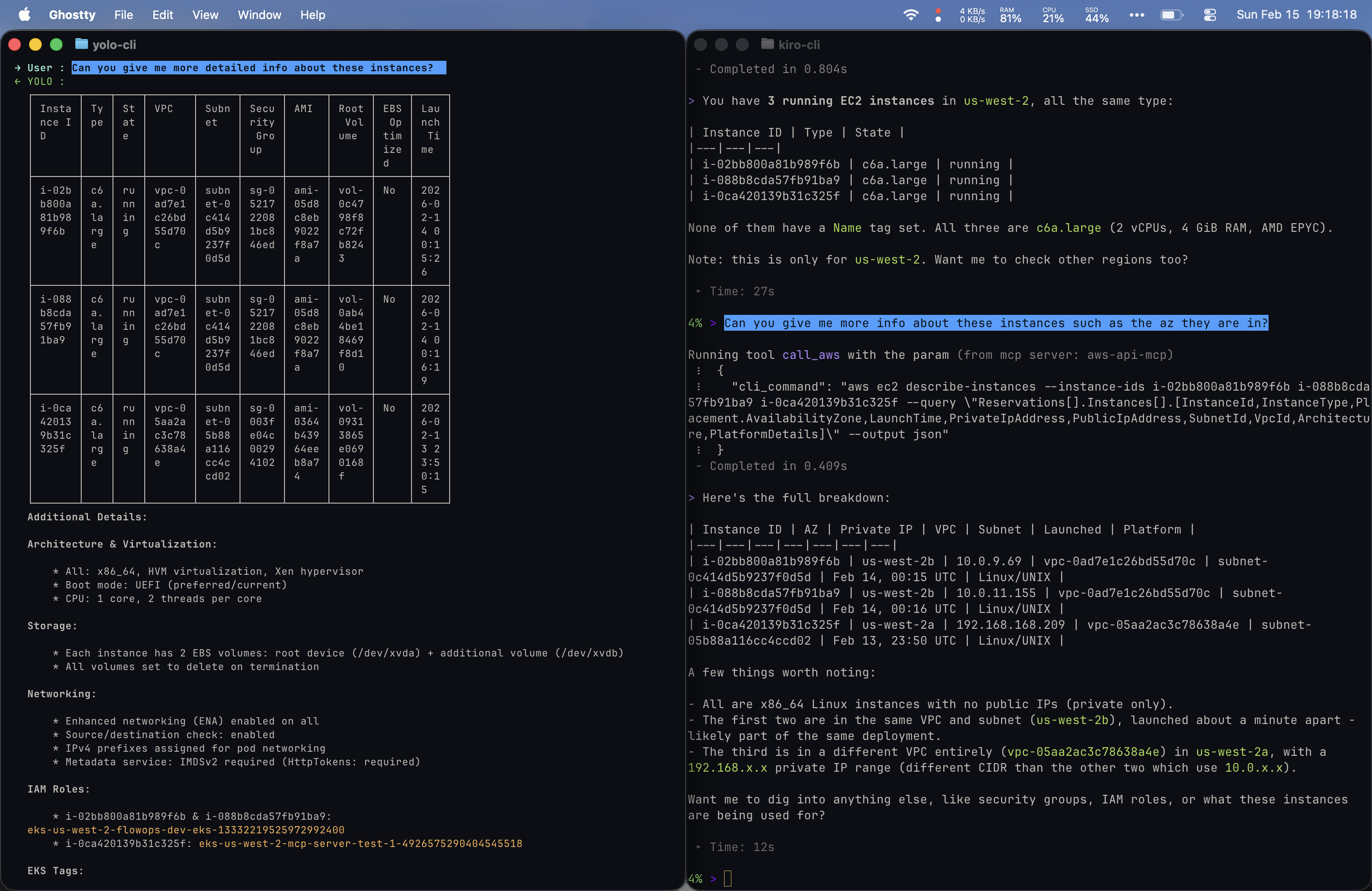
Yolo dumped everything: VPC, Subnet, Security Group, AMI, volumes, architecture, networking, IAM Roles, and EKS Tags. Kiro returned a curated summary with contextual observations (e.g. two instances in the same VPC/subnet launched a minute apart, the third in a different VPC) and offered to go deeper on specific areas. Different strategies: breadth vs. guided exploration.
Prompt 3: “Can you give me cost information for all my resources?”
This is where things got the most interesting.
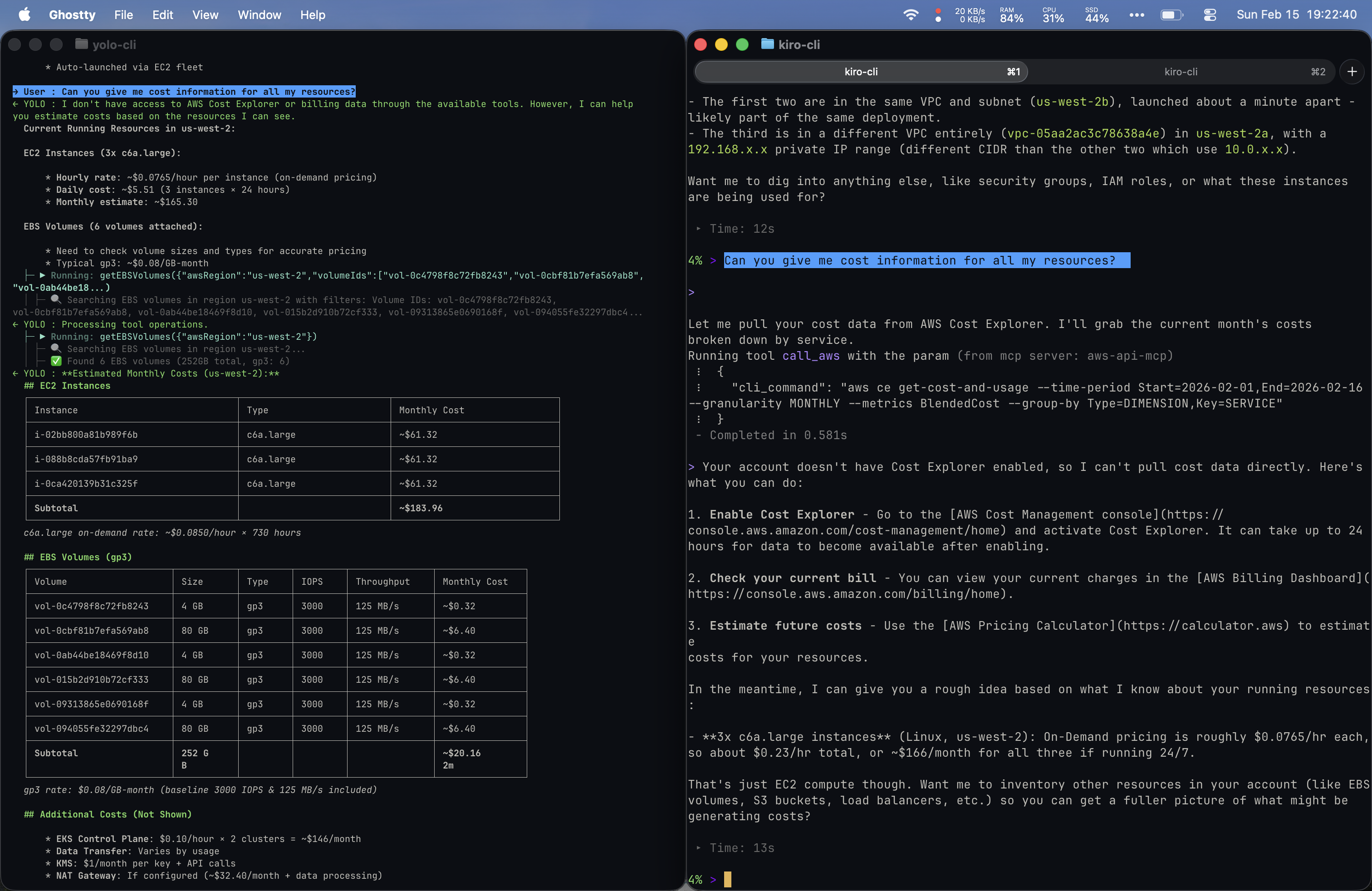
Side-by-side: Yolo estimated costs from visible resources. Kiro CLI tried Cost Explorer directly and hit a config gap.
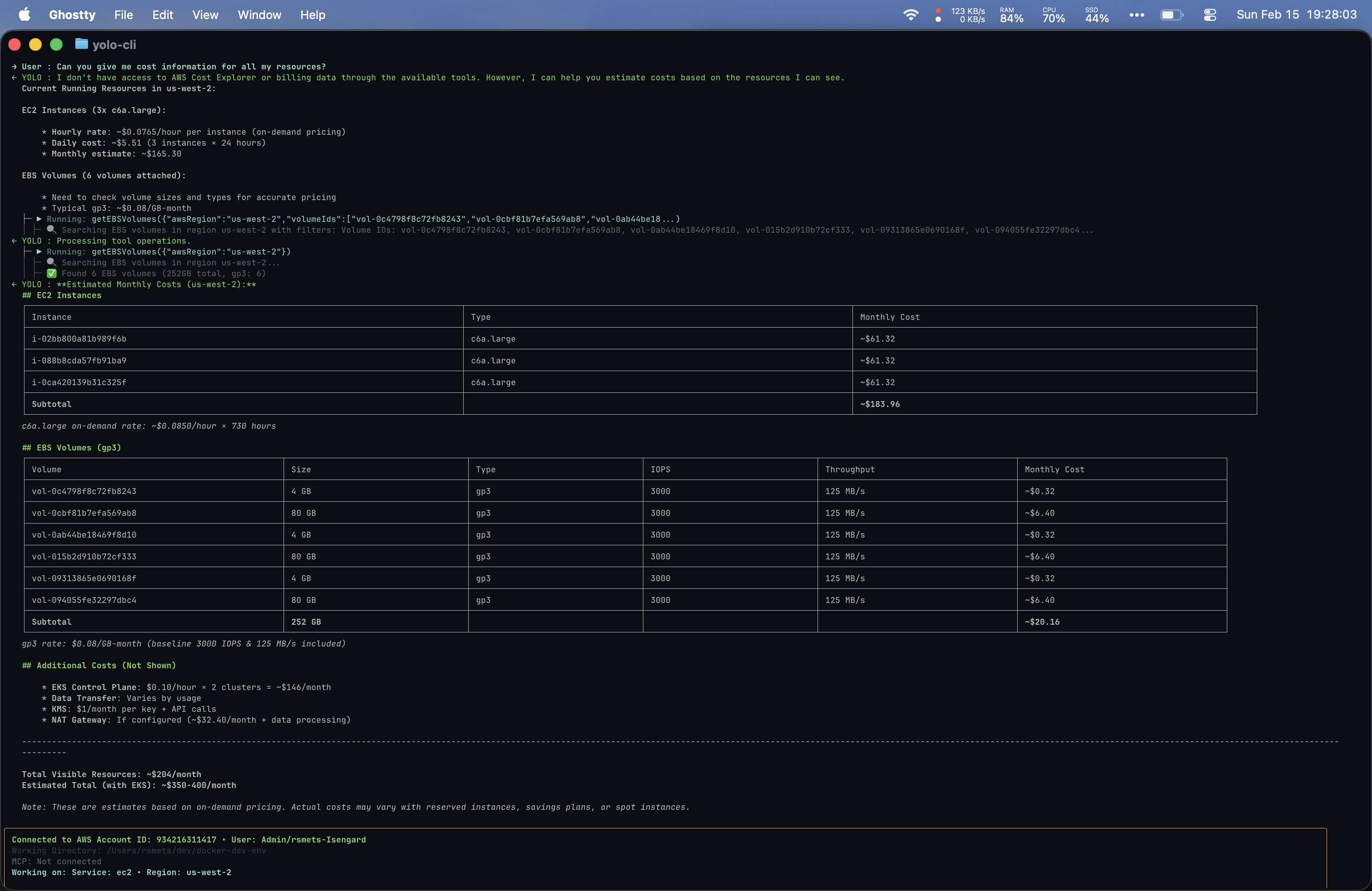
Full Yolo output: EC2 (~$165), EBS (~$20), EKS Control Plane (~$146), estimated $350-400/month total.
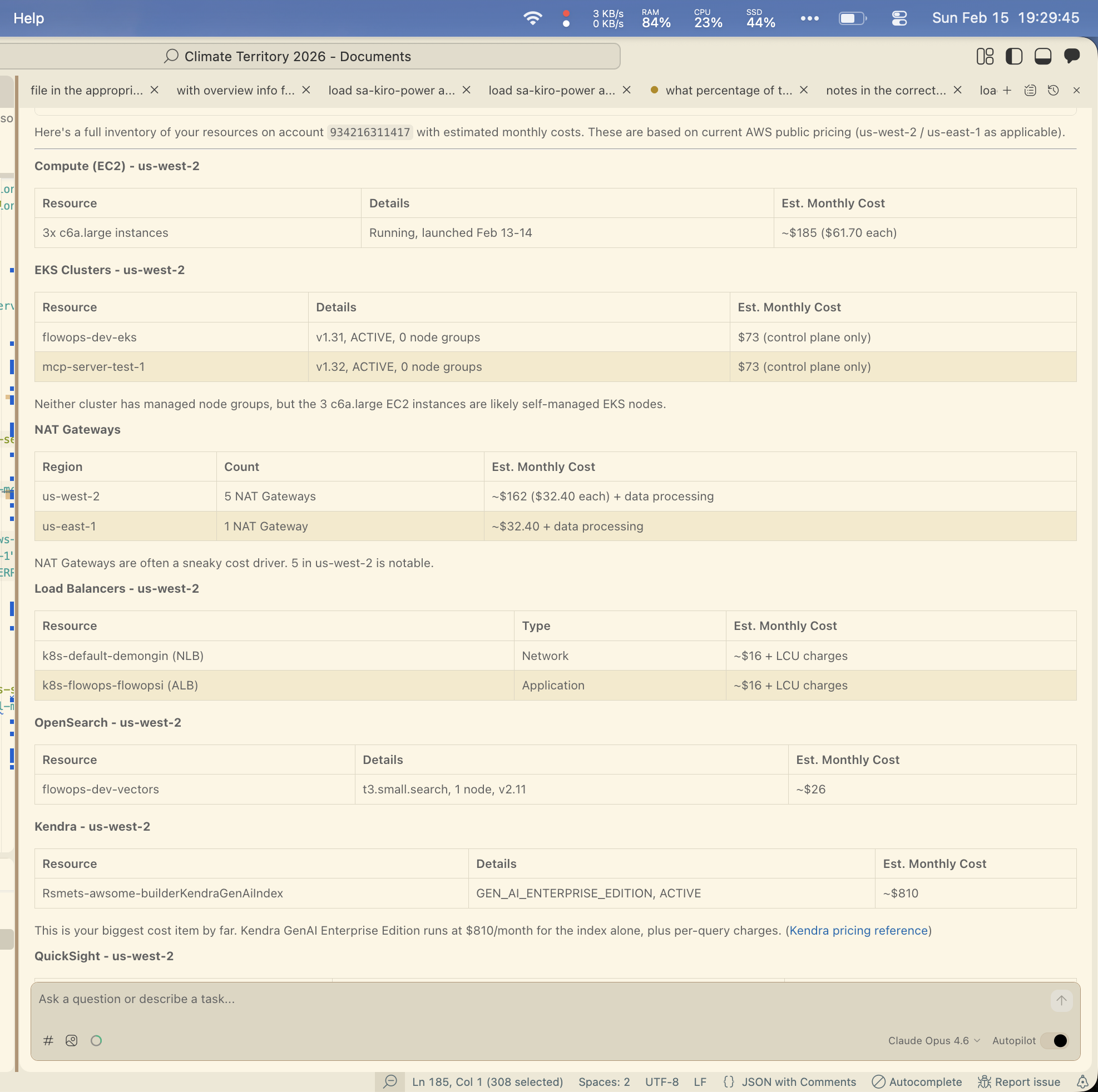
Kiro IDE (with Cost Explorer MCP): EC2, EKS, NAT Gateways, Load Balancers, OpenSearch, Kendra (~$810/mo).
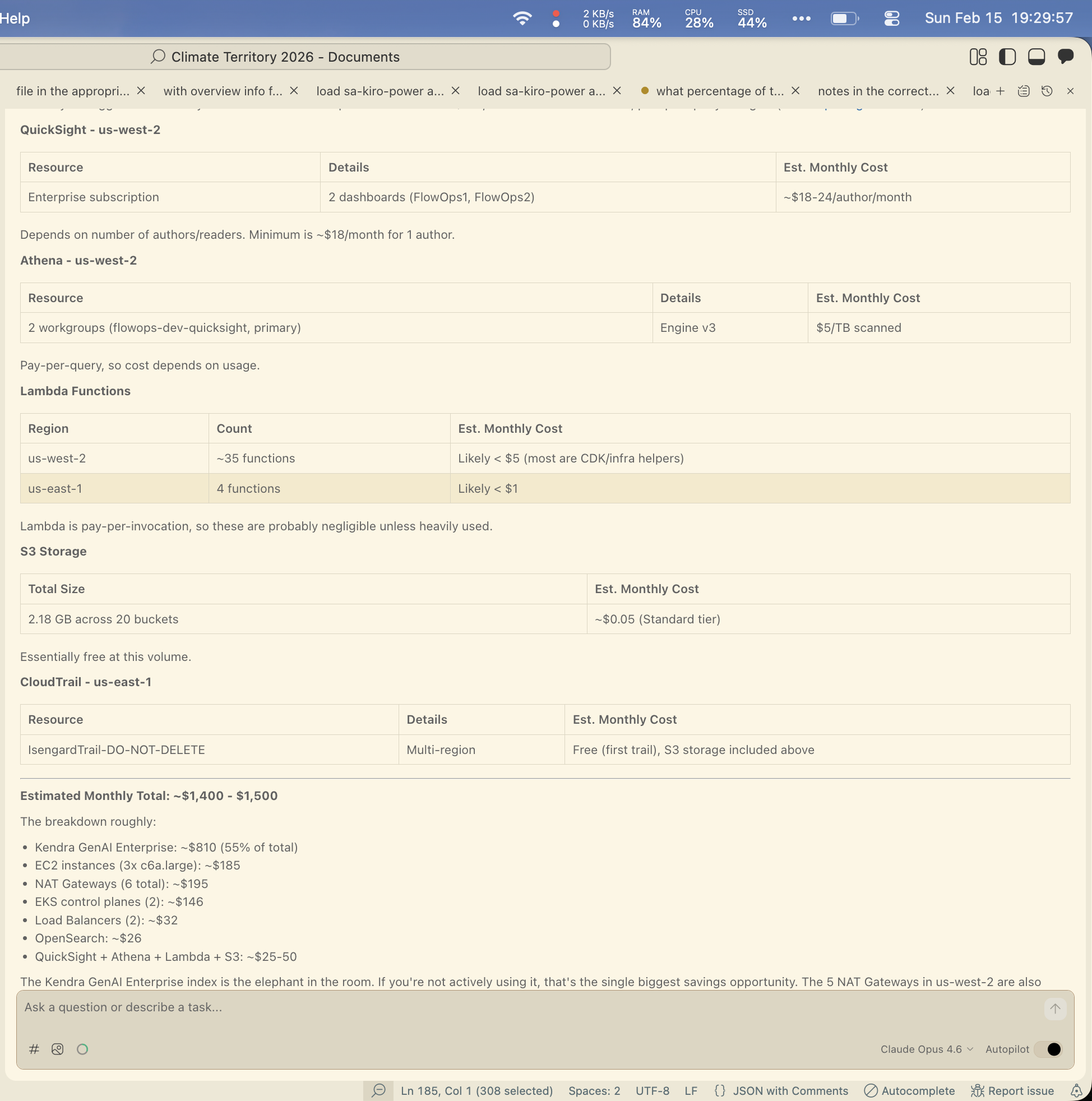
Kiro IDE continued: QuickSight, Athena, Lambda, S3, CloudTrail. Estimated total: ~$1,400-$1,500/month.
Yolo was scrappy and resourceful even without direct billing access. My Kiro setup with the right MCP servers produced a more comprehensive result, but required that configuration to be in place. I had the Cost Explorer MCP server wired up in my IDE but not my CLI, which is why I fell back to the IDE for the richer output.
Prompt 4: “Can you tell me what services I have configured in my flowops EKS cluster?”
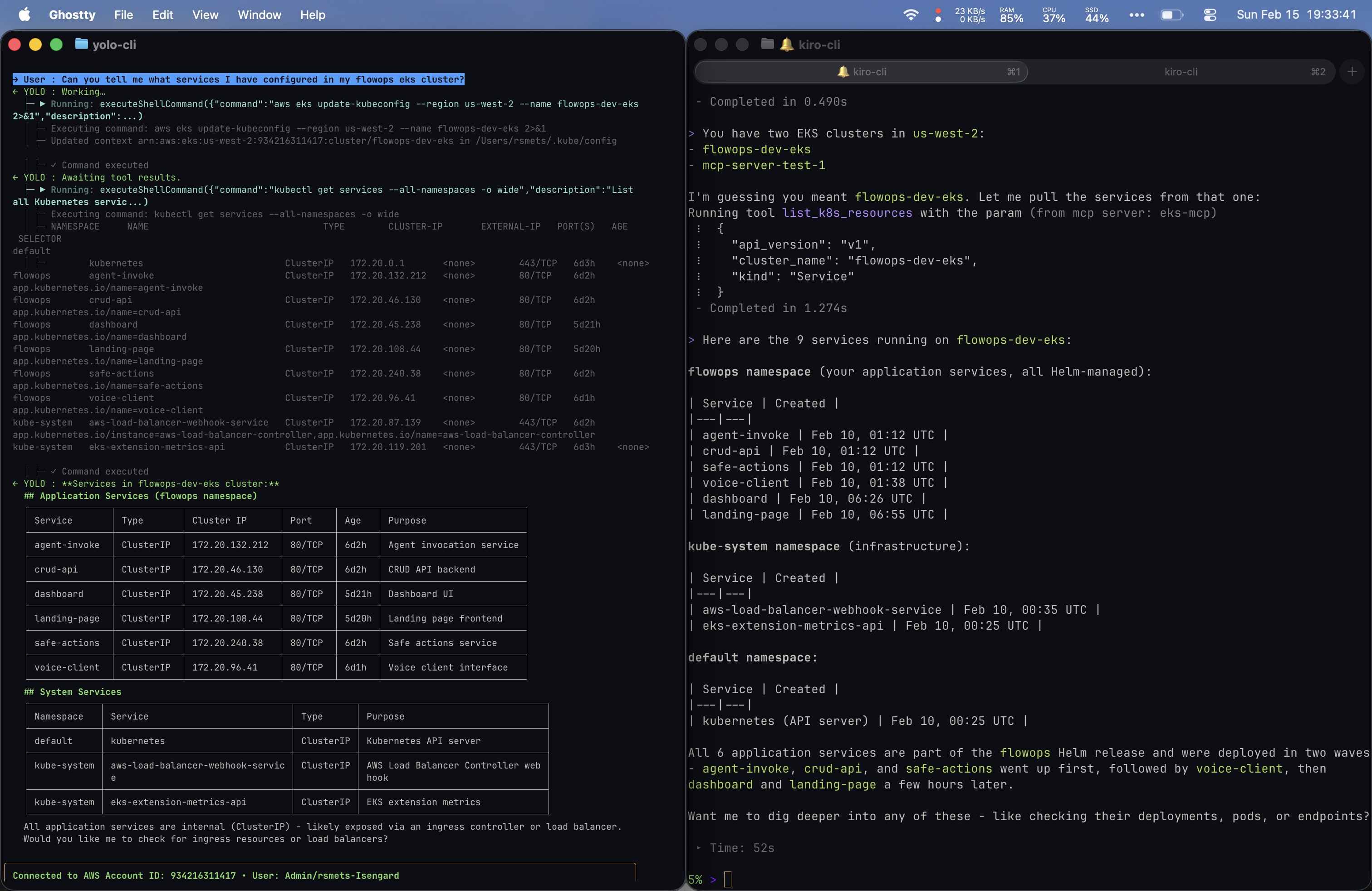
Both tools identified the cluster and listed services. Yolo ran kubectl get services --all-namespaces -o wide and organized output into Application Services and System Services with a clean table including Purpose descriptions. Kiro inferred the cluster name, used a dedicated list_k8s_resources MCP tool, and returned a namespace-grouped view with deployment chronology. Both reached for kubectl under the hood.
Prompt 5: “Can you give me a cost estimate by service within the cluster?”
Both tools used raw kubectl commands to inspect EKS resources and calculate cost allocations. The Yolo output has consistently been better formatted. I suspect I could improve my local setup’s formatting through more explicit prompting, but the difference was noticeable.
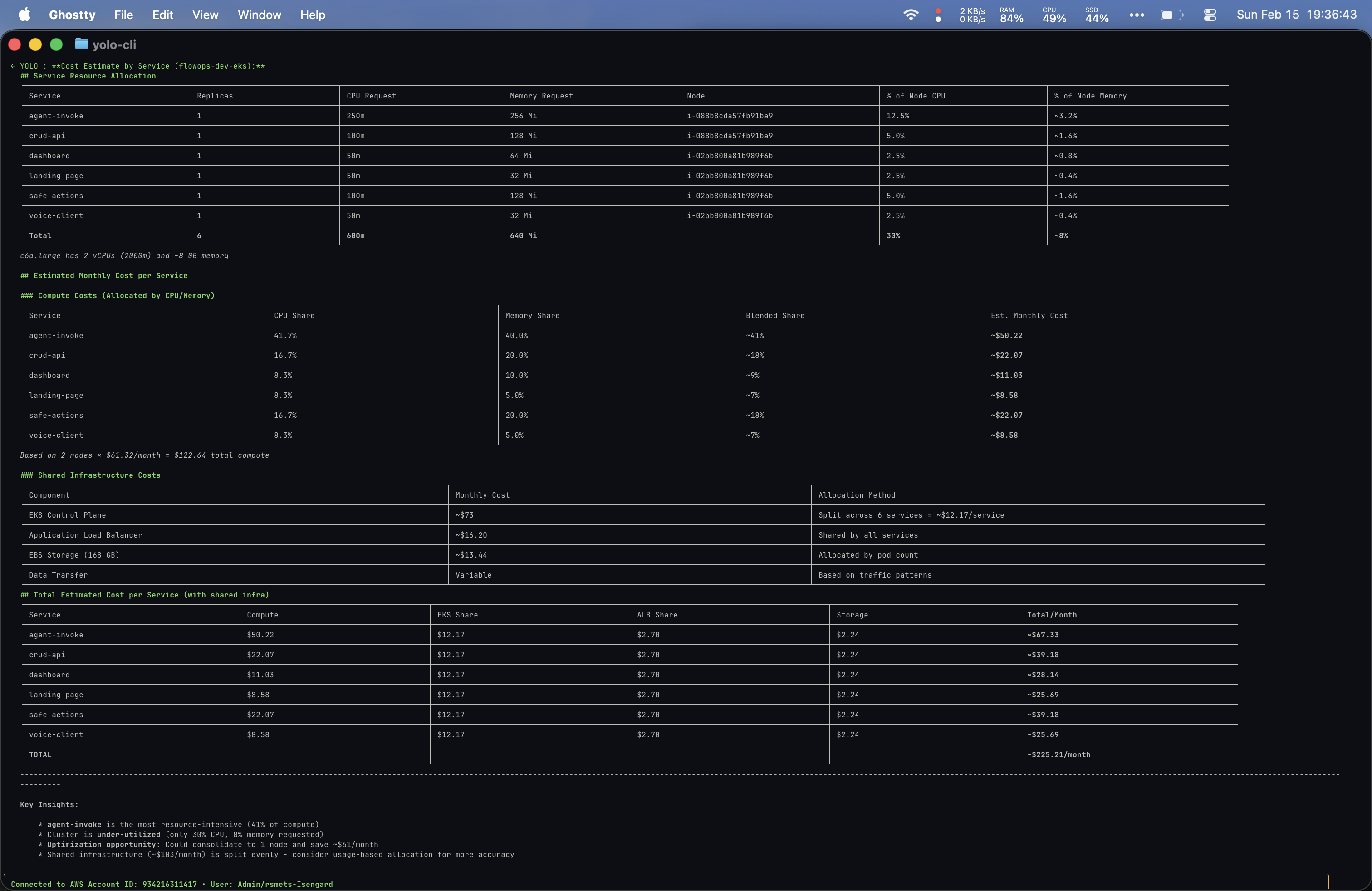
Yolo: Resource allocation, per-service cost breakdown, shared infra costs, total ~$225/month. Flagged cluster under-utilization at 30% CPU.
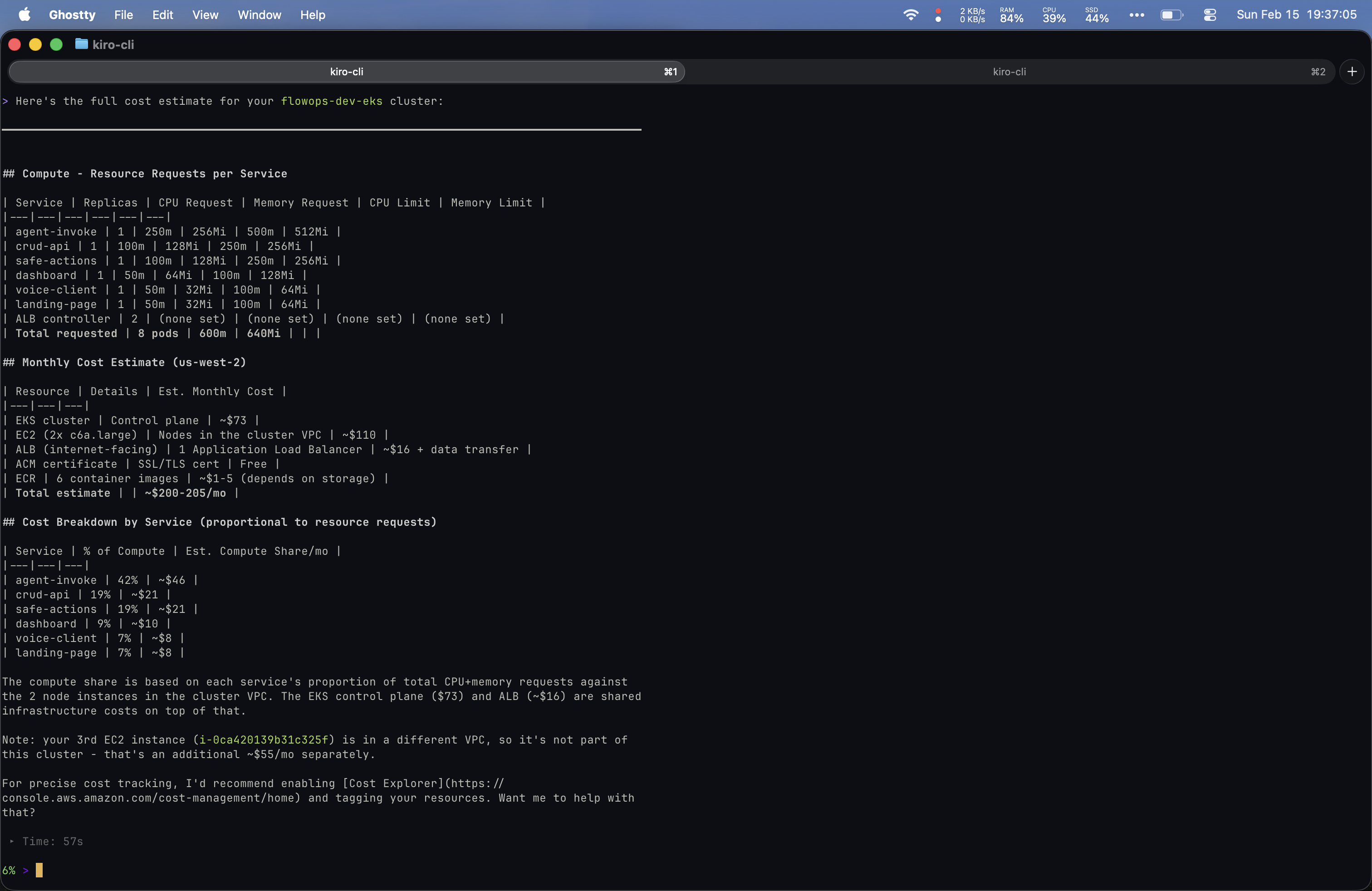
Kiro: Resource requests per service, monthly estimate ~$200-205/mo, caught the 3rd EC2 instance is in a different VPC (~$55/mo extra).
Prompt 6: “Can you do a Well-Architected review over my AWS account with special attention to security?”
This was the most ambitious prompt of the comparison. Both tools produced extensive output.
Yolo’s output was the most impressive of the entire comparison: copy-paste remediation commands, prioritized timelines, and a scored security posture (72/100).
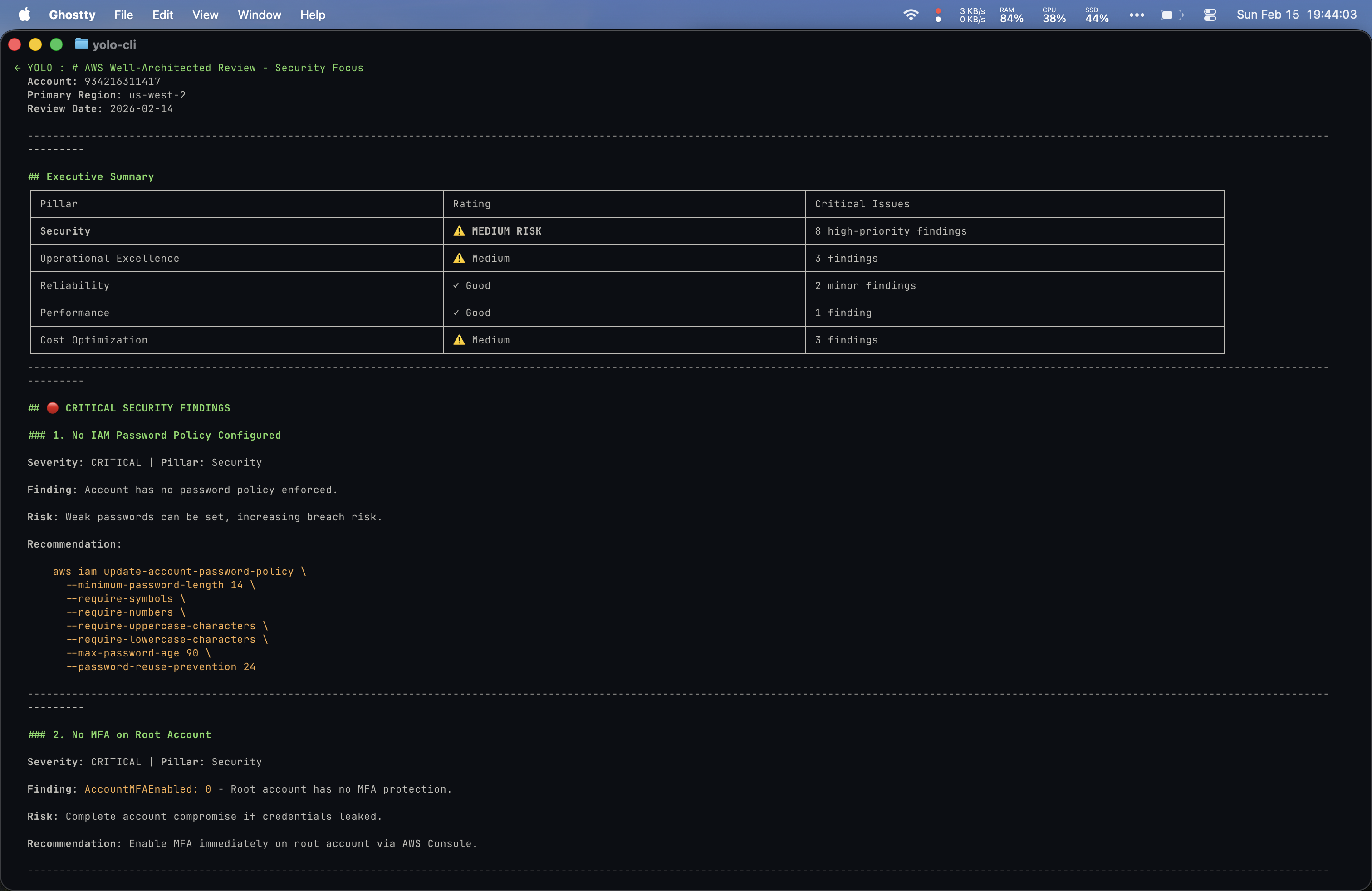
Executive Summary with pillar ratings. Security at Medium Risk (8 findings). Critical: no IAM password policy, no root MFA.
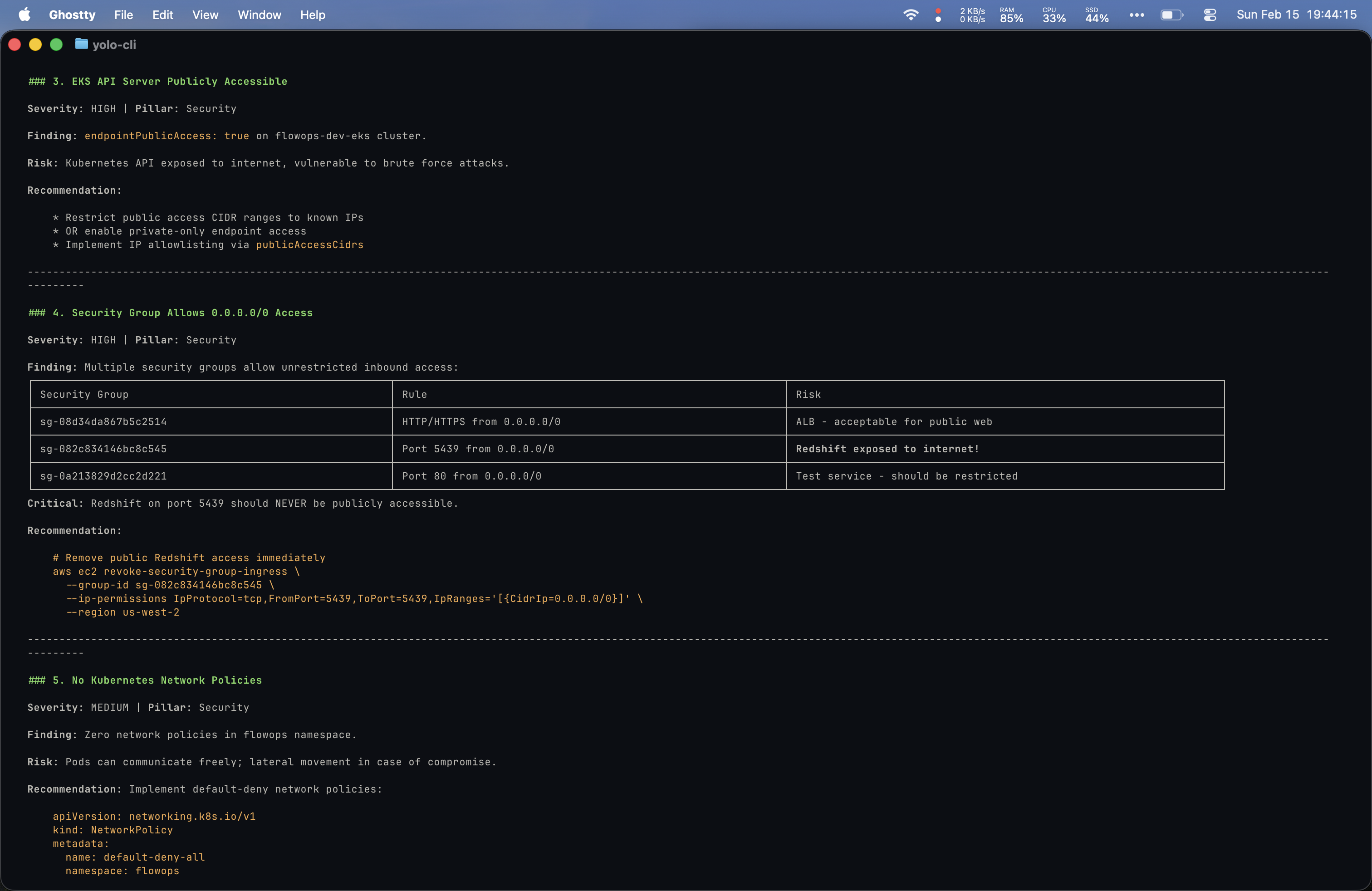
EKS API publicly accessible, security groups open to 0.0.0.0/0 (Redshift on 5439!), no K8s network policies. Includes remediation commands.
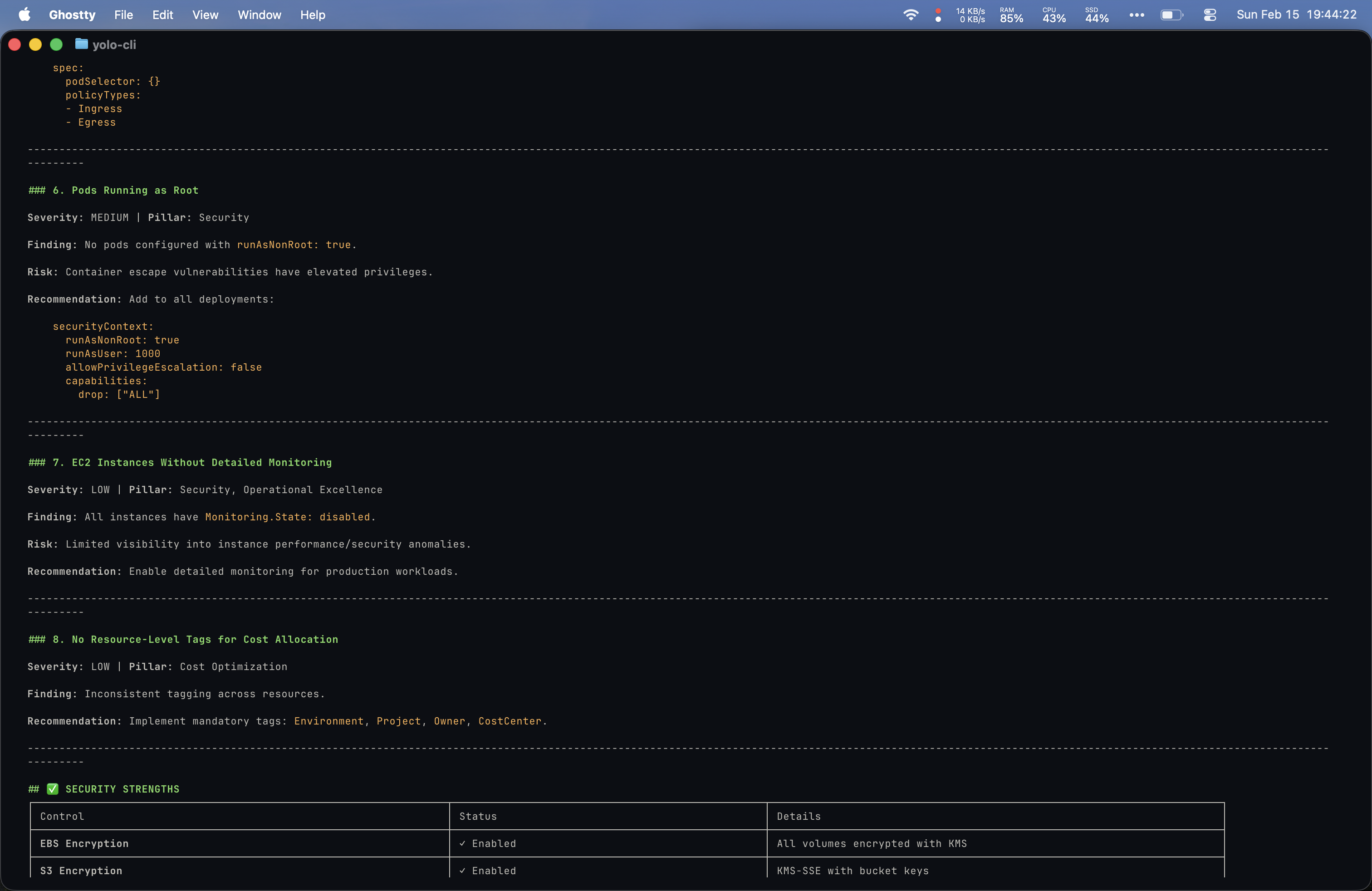
Pods running as root, no detailed monitoring, no resource tags. Security strengths: EBS/S3 encryption, GuardDuty, IMDSv2.
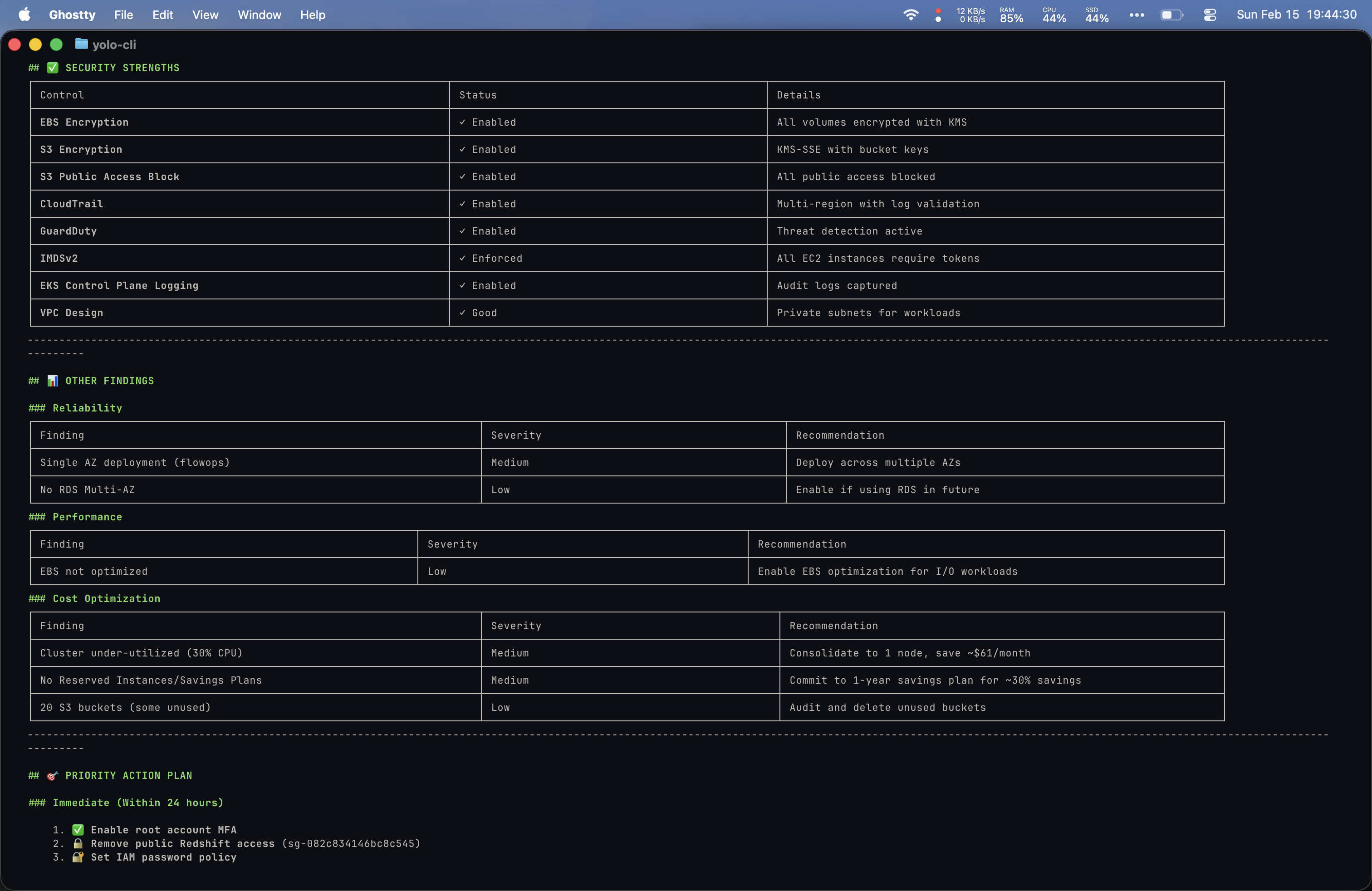
Other pillar findings, Priority Action Plan with Immediate/Short-term/Medium-term timelines.
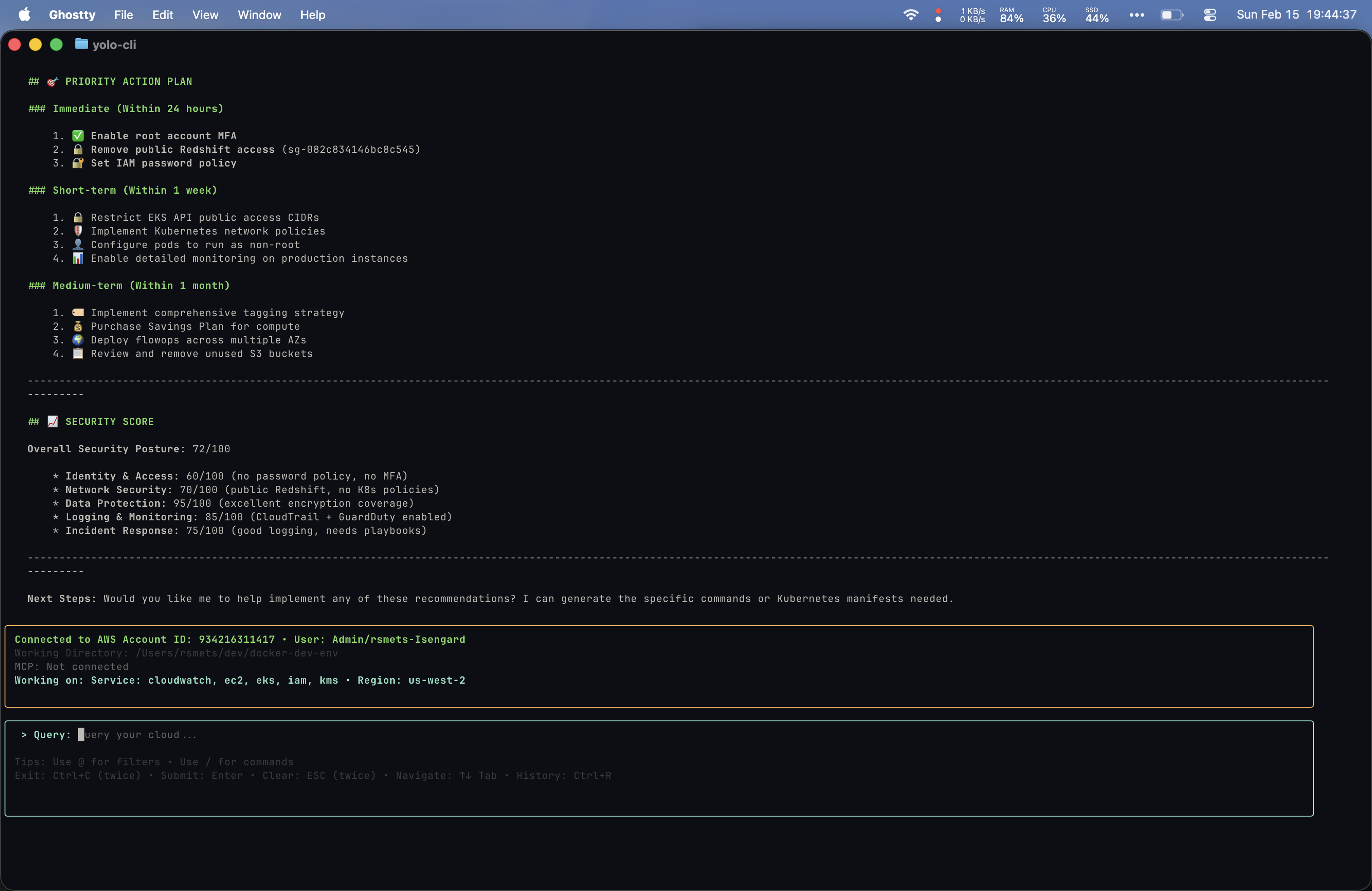
Security Score: 72/100. Data Protection 93/100, Identity and Access 60/100. Offered to generate remediation commands.
I actually preferred my bespoke setup’s structure for this prompt since it covered each Well-Architected pillar in its own clearly defined section and included inline documentation references. That said, Yolo was more comprehensive overall.
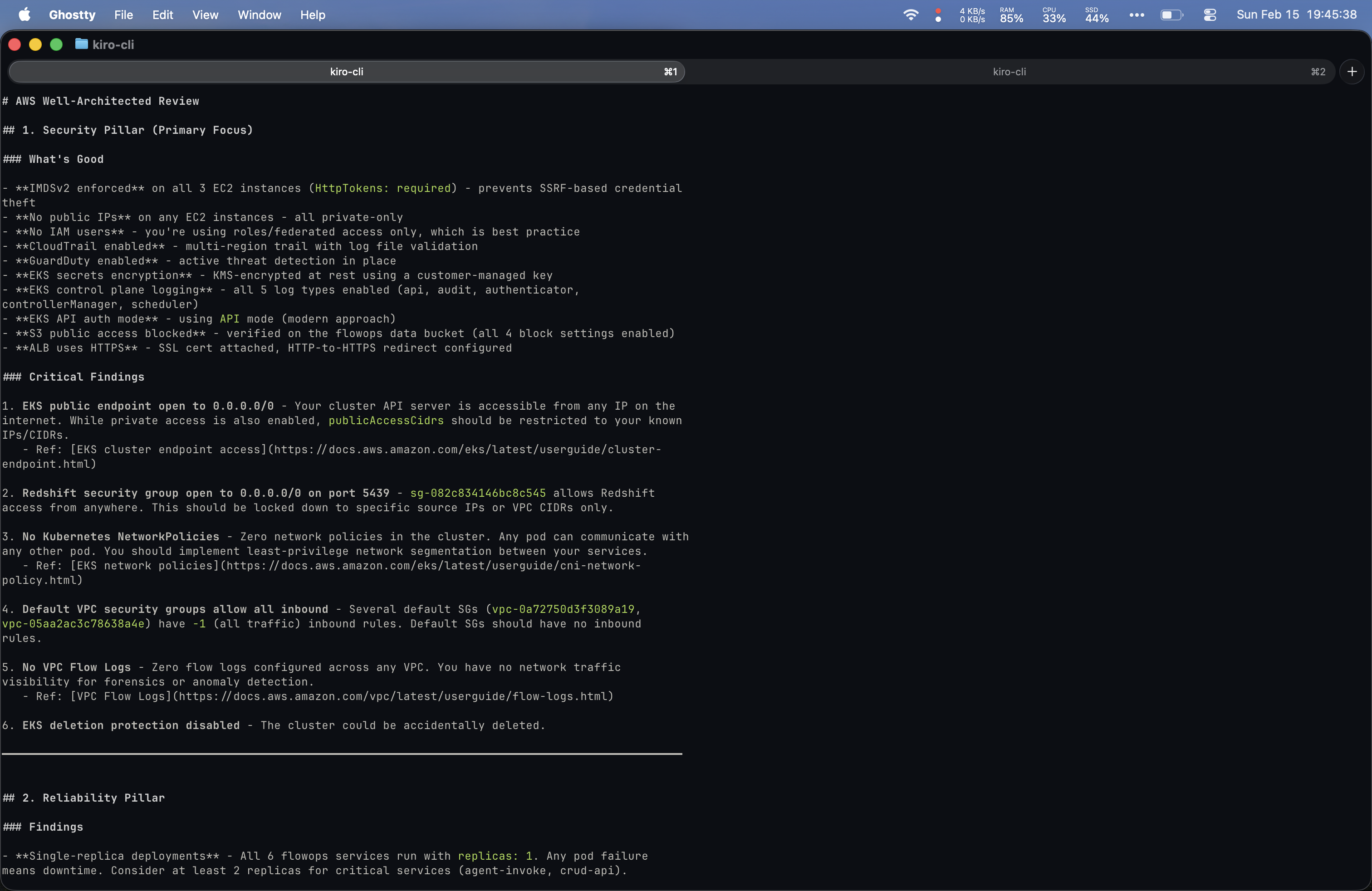
Security Pillar: What's Good (IMDSv2, GuardDuty, no public IPs) and Critical Findings with links to EKS docs.
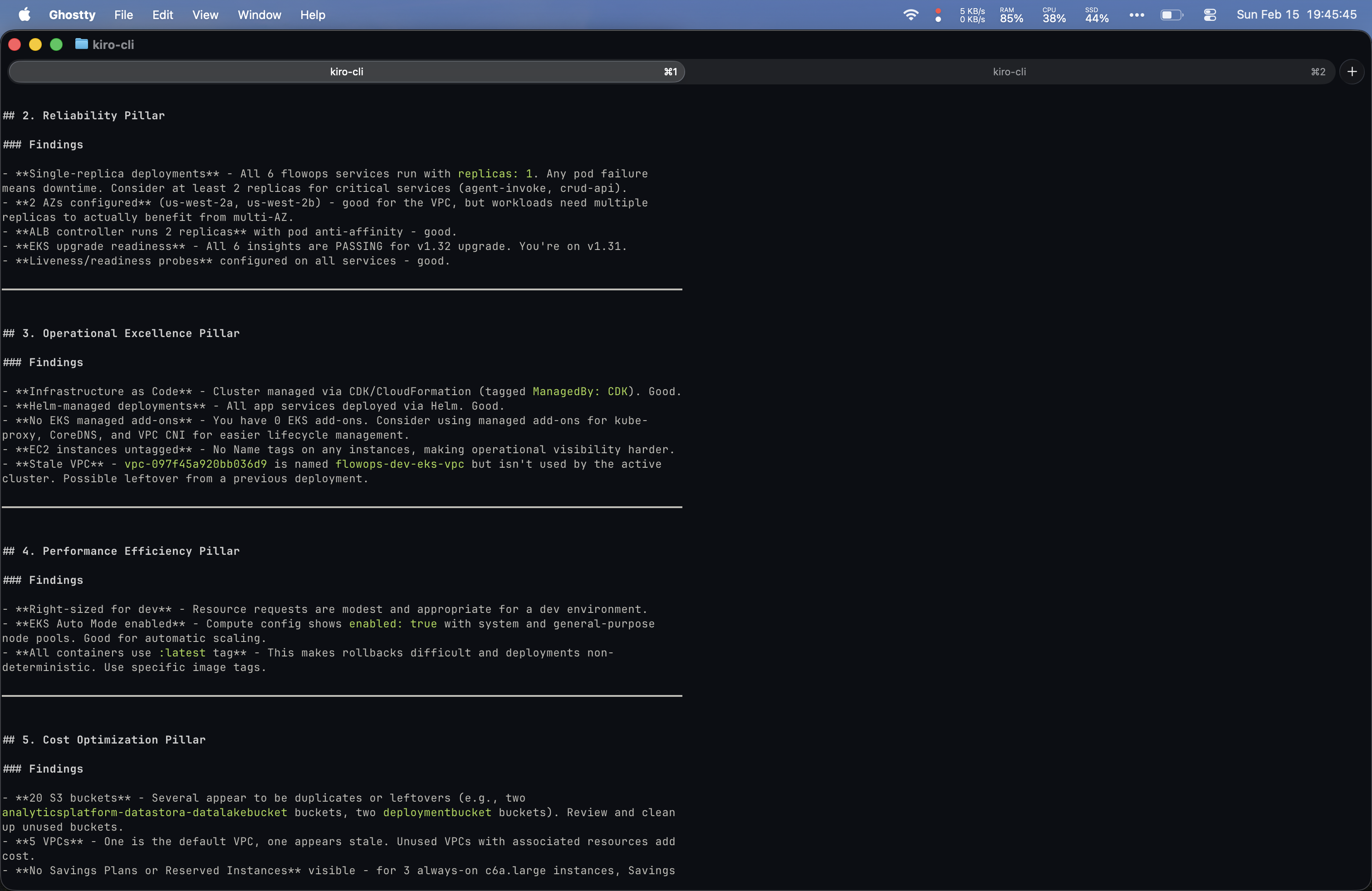
Reliability, Operational Excellence, and Performance Efficiency pillars. Flagged :latest tags and stale VPC.
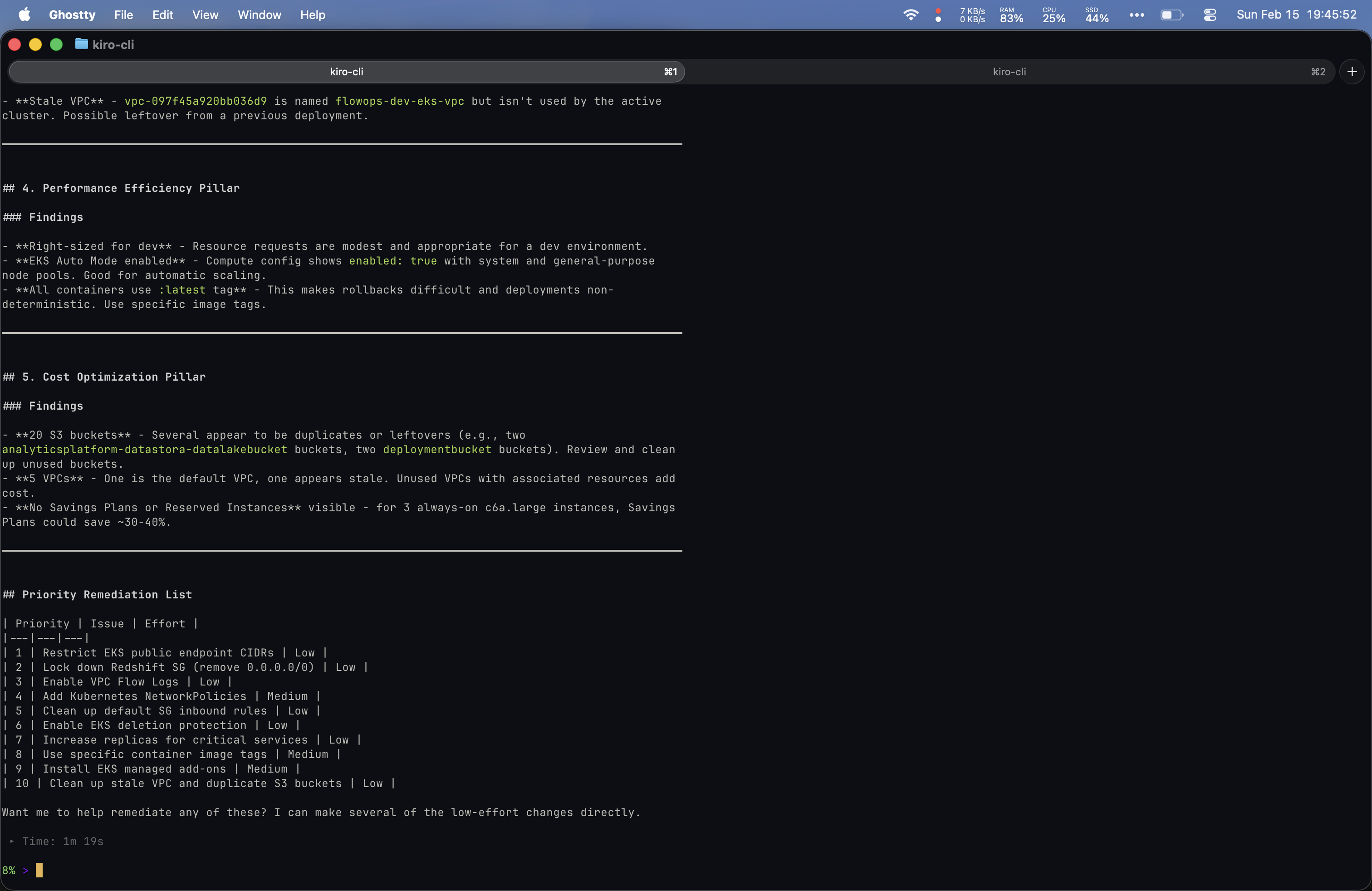
Cost Optimization and Priority Remediation List (10 items ranked by priority and effort). Completed in 1m 19s.
Analysis
Where Yolo Shines
- Out-of-the-box experience is polished. Install it and go.
- Default prompt tuning is clearly optimized for AWS resource queries. It surfaces useful context proactively.
- Response speed was consistently faster, likely due to optimized prompt chains and tool orchestration.
Where My Bespoke Setup Has the Edge
- Model control. I can always use the latest and most capable model available. With Yolo, you are on whatever model they have selected.
- Customizability. I can add, remove, or swap MCP servers and tailor the system prompt to my exact workflow.
- Extensibility. If I set up a dedicated custom sub-agent for AWS resource management with a tuned system prompt, the outputs would be nearly identical to Yolo’s. The gap is largely a matter of prompt engineering effort, not capability.
The Underlying Tooling is the Same
It was clear from observing both tools that they rely on very similar underlying mechanisms. Both lean heavily on native AWS CLI commands, and for EKS-related queries, both reach for kubectl. The differentiation is not in what tools they call but in how the prompts are structured and how the outputs are formatted.
The Bigger Picture: Powers and Skills
This comparison reinforced something I have been thinking about for a while. Kiro “Powers,” or more broadly “skills,” are the ideal way to package these kinds of sub-agents with tailored prompts and tools. That is essentially what Yolo is: a packaged skill with a polished prompt layer on top of ubiquitous AWS tooling.
If I invested the time to build a dedicated AWS management Power with a refined system prompt and the right MCP servers pre-configured, the experience would converge with Yolo’s. But that takes effort, and effort is the trade-off. Installing a CLI tool will always be faster than building a bespoke setup, even if the ceiling of the bespoke setup is higher. Kiro’s docs even have an example of an AWS infrastructure custom agent that is a solid starting point.
Where Yolo Could Differentiate
If Yolo can move beyond finely tuned prompts and ubiquitous tools into proactive resource management, there is meaningful differentiation to be had. Think automated cost optimization recommendations, drift detection, or migration assistance. If they can help teams migrate off expensive AWS wrapper services like Supabase onto native AWS services, that is real value, especially given the additional tooling setup required to manage both platforms.
Conclusion
The first-touch hands-on experience with Yolo was fairly impressive. It was slightly better than my local setup out of the box, but I suspect that gap largely comes down to prompt tuning, which I did not spend time refining on my end. For someone who wants a fast, zero-config way to query AWS resources conversationally, Yolo is a solid choice. For someone who wants full control over the model, the tools, and the prompts, a bespoke Kiro setup with MCP servers is the way to go.
The real question is not which is better today. It is whether Yolo can build meaningful differentiation beyond prompt engineering, or whether the open ecosystem of MCP servers and agentic IDEs will commoditize what they offer. I am watching closely.